how to register your seller account using your mobile phone.
If you don't have a store yet and you want to sell your product to the internet follow this step to set up your store.
- Compare selling plan
First visit our pricing page to compare and see which plan worth your business
Go to Namibian-online-store.com/open-new-shop.
- Click on login/register button
Go to our website home(namibian-online-store.com) and click on login/register button

- Register as a vendor
Navigation to register bar and click register as a vendor

- Fill the registration form
Now enter your details as well your business details in the form below.
Email address :enter your email address.
Password :create the password you will use to login to your account
First name; enter your surname.
Fast name :enter your name.
Shop: enter the name of your business/shop here
Shop url : leave it blank it will generate your shop link automatically.
Company name :enter the name of your company/business can be the same as shop name
Company id: enter your business' registration number if any, you can leave it blank if your business is not yet registered.
Vat number: enter your tax number here you abstain from the ministry of inland revenue, you can also leave it blank if you business is not yet registered.
Phone number: enter your cell number here
- Accept our term and conditions
Read our term and conditions and click I have agreed to the term and conditions.

- Select the selling plan
Choose the selling plan you wish, You can also read more on Selling plan and features assign to each plan here

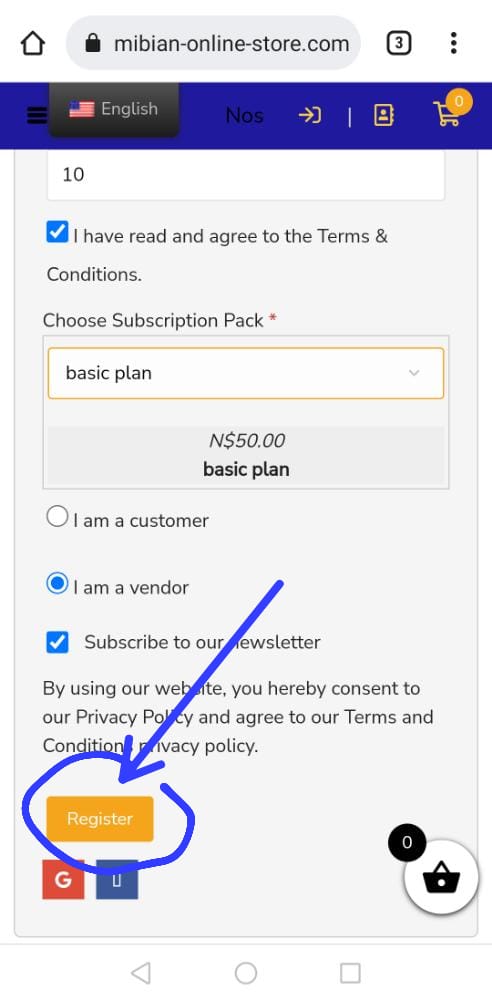
- Click the register button
click the register button to finish the registration process

- Pay your selling plan
Pay your set up fees depending on the plan you select earlier in step 5 and the one you choose when you where comparing the selling plan.

- Login to your seller's dashboard
Just after you complete your payment you will be able to get your store dashboard where you can add products, manage orders and much, Your store is ready you are ready to sell to the internet. Checkout our other articles. How you can add products to your shop and publish them To be seen by every on the internet. How to set customize your shop page, how to set up live chat to chat with your customers, how to configure Google maps to shop your clients where your shop is located, how to add your term and conditions, set up delivery fees per region, set up your return policy and warranty information, how to accept payment and make withdrawal, how to translate your products in different languages like Oshiwambo, how to put your store on holiday mode, CONFIGURE SEO and much more!!